
How to Create a 3D Impasto Effect in Procreate (In Seconds)
- Mar 23
- 2 min read
(I timed it- this takes about 15 seconds once you know the steps!)

Ready to make your digital paint strokes look more real?
This is a Procreate painting tip that will make your digital paint pop off the canvas!
Think oil paint effects for Procreate with thick painterly strokes.
This little Procreate oil paint tip will give you a 3D digital impasto effect that will make your digital paintings feel more real.
(It’s so simple I even debated whether or not I would share this.)
But just in case you don't know this little trick, here's what you can do. ⤵️
First, grab an oil paint brush and make a few brushstrokes on the canvas.
I'm going to use my Impasto brush.
By the way: You can get these brushes for free right here! 🖌️

Now tap the Layers icon and swipe left on the layer.

And press Duplicate.

Now tap to select the initial layer. We're going to make adjustments to this bottom layer.

Go to Adjustments (the little magic wand) > Hue, Saturation, Brightness.
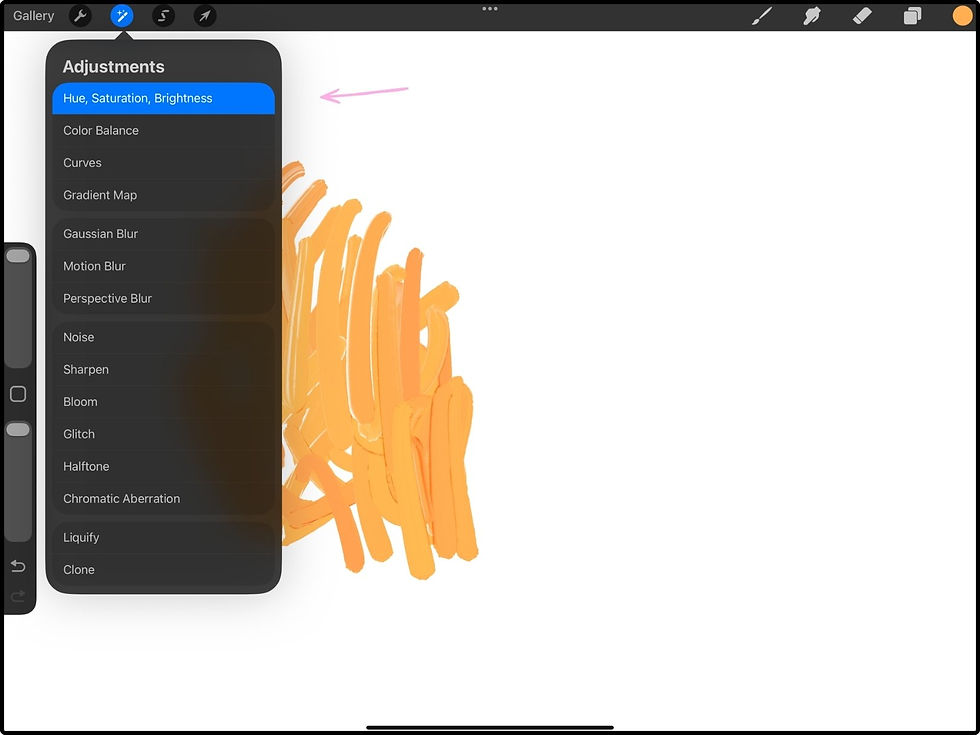
Then slide the Brightness slider down. You can tweak the other two sliders a little bit as well if you'd like. But the main one to manipulate is the Brightness. You'll be making this layer darker in value.

Now tap Layers to deselect everything. You'll see now that the bottom layer will be darker.

Now tap the Transform icon (the arrow).
And with your finger, shift that layer we just darkened to the side juuust a bit. This will create a cast shadow sort of effect.
Then tap the arrow again to deselect everything.

Instantly, you're going to get this very 3D-looking effect to your paint strokes, because now it will look like the paint globs are casting a shadow! All with one simple tweak.

This works especially well for finishing touches on painterly pieces.
And it's a quick Procreate technique that adds so much depth. (Perfect if realistic digital painting is the goal.)
If you've been wanting a 3D paint effect in your digital art, this little painterly brush stroke trick is one of the easiest ways to get there.
Extra Tips:
Consider using this sparingly! Use it on special brush strokes that you want to pop off the page.
Experiment with how much you pull the shadow layer away from the other layer. Too much distance may start to make it look fake. Also, play with the angle you pull it away- try slightly left, up, down, right, etc.
Give it a go! :)
And try the Impasto Brush and more of my favorite free Procreate brushes!
